
Hue Control1.3.9 - Google Play
You'll be able to see results in few seconds.
Publisher Description
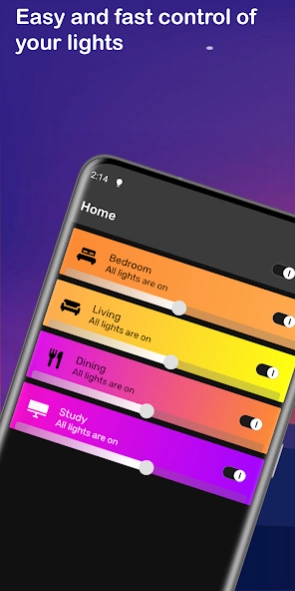
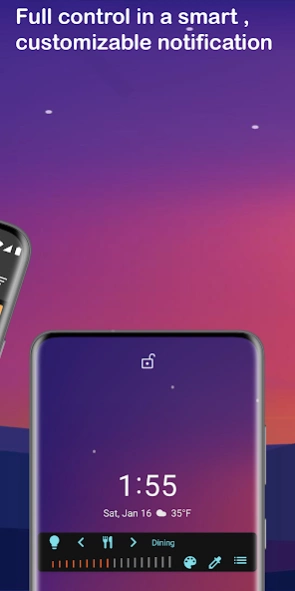

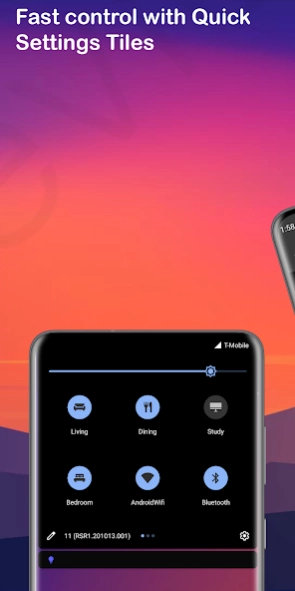
Control Philips Hue lights faster and easier
Purpose• Addition to the Philips Hue App
• Quick and easy control lights in the Control Notification and Quick Settings Tiles
Main features
• Contol Notification to quickly control Philips Hue lights, even from your lock screen
• Automate the notification: it will only be on your screen when you need it
• Configure Quick Settings Tiles to quickly toggle lights, activate a scene or change colors
• Connect to multiple bridges simultaneously
• Create scenes that contain lights from multiple bridges
• Powerful color picker
• Pick colors from your favorite pictures and save them as scenes
• Control Philips Hue Lights
• Manage rooms, zones and scenes
• More to come...
Control Notification
Control Philips Hue lights with greater ease and speed with the smart control notification. This is available when a connection can be made with a Philips Hue Bridge and will disappear automatically when the connection is lost. Switch lights on and off, choose a color or switch on a scene, all directly from the control notification.
Scenes
Use the powerful color picker to choose from millions of colors for your lights. You can choose lights from different groups, zones and even from multiple bridges.
Multiple bridges
Hue Control lets you interact with multiple bridges at the same time. You can already create scenes that contain lights from multiple bridges, and soon you'll also be able to do that for rooms.
Pro features
• Control more than 2 groups in the notification.
• Configureore than 2 Quick Settings Tiles
Requirements
• Philips Hue Bridge
• At least 1 Philips Hue Light bulb
• WiFi connection (away from home connection will be added soon)
About Hue Control
The company that develops Hue Control is Beuzenberg Applications. The latest version released by its developer is 1.3.9.
To install Hue Control on your Android device, just click the green Continue To App button above to start the installation process. The app is listed on our website since 2021-05-15 and was downloaded 0 times. We have already checked if the download link is safe, however for your own protection we recommend that you scan the downloaded app with your antivirus. Your antivirus may detect the Hue Control as malware as malware if the download link to com.beuzenberg.huecontrol is broken.
How to install Hue Control on your Android device:
- Click on the Continue To App button on our website. This will redirect you to Google Play.
- Once the Hue Control is shown in the Google Play listing of your Android device, you can start its download and installation. Tap on the Install button located below the search bar and to the right of the app icon.
- A pop-up window with the permissions required by Hue Control will be shown. Click on Accept to continue the process.
- Hue Control will be downloaded onto your device, displaying a progress. Once the download completes, the installation will start and you'll get a notification after the installation is finished.
Program Details
System requirements
Download information
Pricing
Version History
version 1.3.9
posted on 2021-05-15
- Screens opened from the notifcation/quick settings tiles will now be displayed as popups, so you can quickly resume with the app that was on the foreground
- If configured and connected to a bridge, the notification will also be shown when you reboot your phone
version 1.3.8
posted on 2021-04-06
- Fixed issue when changing state of multiple lights at once
- Various stability improvements
version 1.3.7
posted on 2021-01-30
- Solved an app crash that would occur when searching for bridges
- Several stability improvements
version 1.3.6
posted on 2021-01-17
- Improved detecting new Bridges
- Added option to manually enter an IP of a Bridge to connect to
- Various stability improvements
version 1.3.0
posted on 2020-12-30
- Resolved a connection issue
version 1.2.6
posted on 2020-12-13
- Fixed issue that prevented groups from being deleted
version 1.2.4
posted on 2020-12-12
- Improved connection stability
- Improved Quick Settings Tiles reliability
- Some users were experiencing issues with the home screen not showing that the lights are on, that should be fixed now
version 1.2.3
posted on 2020-11-28
- Home screen now shows per room how many lights are on
- Improved syncing lights, groups and scenes
- Some text colors were black in stead of white
- Added translations
version 1.1.4
posted on 2020-11-18
- Added French and Italian translations (40%)
- Added ability to translate the app
version 1.1.3
posted on 2020-11-04
- Displaying the connection status has been improved
- Various stability improvements
Disclaimer
Official Google Play Link
We do not host Hue Control on our servers. We did not scan it for viruses, adware, spyware or other type of malware. This app is hosted by Google and passed their terms and conditions to be listed there. We recommend caution when installing it.
The Google Play link for Hue Control is provided to you by apps112.com without any warranties, representations or guarantees of any kind, so access it at your own risk.
If you have questions regarding this particular app contact the publisher directly. For questions about the functionalities of apps112.com contact us.
